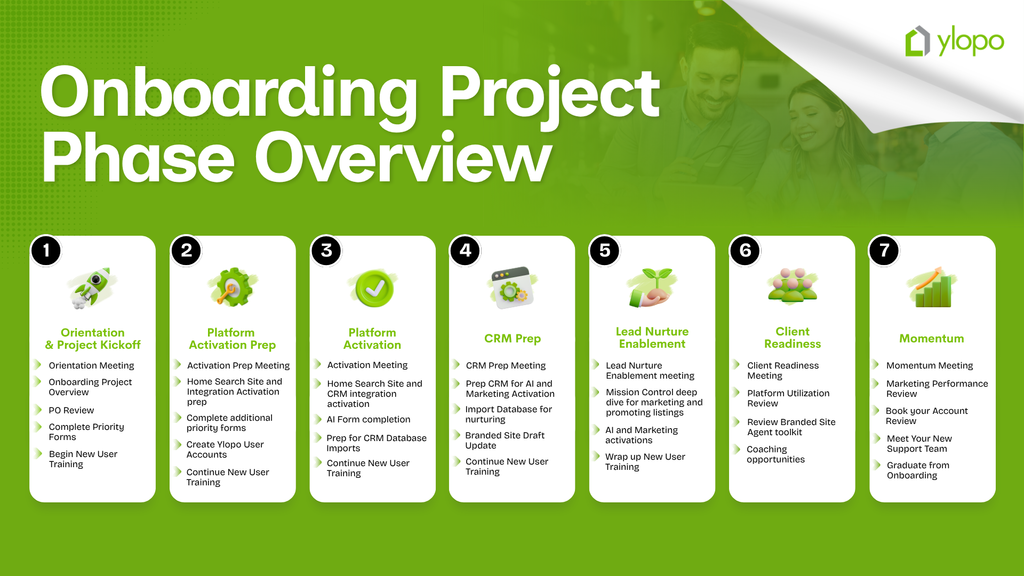
Your Implementation's Journey
This is the start of your success story.
Priority Setup Forms
To begin your onboarding and get your Ylopo account setup started, please complete the Client Information Form and the other priority forms below as soon as you can. We’ll review your forms together during your orientation call and can help you complete them if needed.
1. Ylopo Client Information Form
Completing this form captures the building blocks of information we need to start creating your Ylopo account.
Complete Client Info FormNeed Help Completing the Client Information Form?
Watch this quick video for guidance on how to complete the Ylopo Client Information Form.
2. CRM & DNS Login Information
We will need credentials to the owner's CRM account so that Ylopo can properly integrate with your system.
The credentials you provide will be securely stored. Please do not change your username and password while in setup, as we will be conducting spot checks to make sure leads are coming into your CRM!
Need Help Completing the CRM & Domain Host Form?
Watch this quick video for guidance on how to complete the CRM Domain Host Form.
3. Twilio Business Registration
This form is specific to the business name under which you conduct business as a licensed Real Estate Agent.
Need Help Completing the Twilio Registration?
Watch this quick video for guidance on how to complete the Ylopo Twilio Business Registration form.
How to Access the Ylopo Onboarding Portal
The invitation to the onboarding portal will be sent during your orientation call, so please keep an eye on your inbox at that time. If you do not receive the email, please check your spam or junk folder.